Introducing Travel Time
Your crew’s day doesn’t start when they pick up a hammer. It starts the moment they leave the last job site. Until now, that drive between projects was invisible — unpaid, untracked, and quietly eating into your team’s day.
Not anymore.
We’re excited to introduce Travel Time — a brand new way to capture the hours your team spends on the move, and make sure every minute lands on the right project.
Turning It On
Travel Time lives in your Business Settings, and you’re in control. Head over there and pick the option that fits how your team works best:
- Manual Approve — Every travel request lands in a manager’s queue for review. Adjust the duration, set the allocation, and approve. Best for teams that want a careful eye on every trip.
- Auto Approve — Travel time is logged and counted instantly, no manager review needed. Best for teams that trust their crews and want zero friction.
You can switch between the two anytime as your needs change.
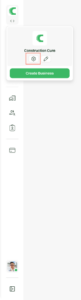
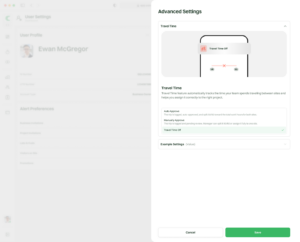
Turning Travel Time on/off in Web App
How It Works
Once Travel Time is switched on, the day-to-day flow is simple:
Step 1 — Add travel when you clock in
When a team member clocks into their next project, they’ll see a new option: “Travel Time.” One tick of the box and they can:
- Choose where you’re traveling to
- Enter how long the trip took
- Clock in like normal
That’s it. The drive is logged.
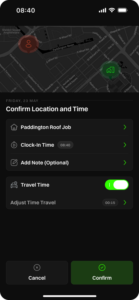 Travel time displayed in mobile app after turning it on
Step 2 — What happens next depends on your setup
If you’re on Auto Approve: nothing more to do. The trip is logged, approved, and counted the moment your team member clocks in. Managers don’t touch a thing. No queues, no follow-ups, no reminders.
If you’re on Manual Approve: the trip lands on the timeline as its own approval request, right alongside overtime. Managers can:
- See the trip at a glance — “45 minutes from Project A to Project B”
- Adjust the duration if needed
- Decide where the time belongs using our new Allocation Slider:
- All to the origin project — wrap-up time for the job they just left
- Split 50/50 — fair share between both projects
- All to the destination project — setup time for the next job
- Add a quick note
- Approve or reject with one tap
One slider. Three options. The right answer for every situation.
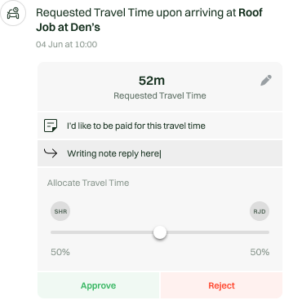
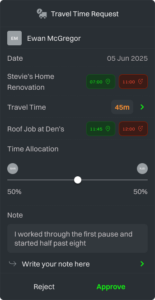
Travel time request waiting to be approved in web and mobile apps
When to Use It
Travel Time is built for teams that work across multiple sites in a day. Reach for it when:
- A crew finishes early at one site and drives to another
- A specialist visits multiple projects in a single shift
- You’re billing clients fairly for the time it takes to get to their job
- You want a clear, honest record of where every paid hour went
If your business runs on the road as much as on site, this feature pays for itself the first week.
Why You’ll Love It
- No more guesswork. Every drive is captured, reviewed, and accounted for.
- Fair to your crew. Time on the road is time on the clock.
- Fair to your clients. Travel costs are split exactly the way they should be.
- Built into the flow you already know. Same clock-in, same timeline, same approvals — just smarter.
Ready to Roll?
Hop into Business Settings, flip Travel Time on, choose your approval style, and you’re off. Your team will see the new “Add Travel Time” option the very next time they clock in.
The road is part of the job. Now your timesheet finally agrees.